
NoUnread · Co-creator
ActiveEverything that matters on WhatsApp, in two minutes
Built by Alina Tomșa and Alex Teodorovici.
For companies that run on WhatsApp. You have dozens of groups and hundreds of messages a day. NoUnread reads them for you and shows who is waiting for an answer, which deadlines are coming up and what was decided.
What you need to do today, without reading 400 messages.
Try it at nounread.com'/%3e%3cpath%20d='M164%20372V140l176%20232V244'%20fill='none'%20stroke='%23ffffff'%20stroke-width='56'%20stroke-linecap='round'%20stroke-linejoin='round'/%3e%3ccircle%20cx='340'%20cy='150'%20r='40'%20fill='none'%20stroke='%235eead4'%20stroke-width='20'/%3e%3c/svg%3e)
From 347 unread messages to an assistant.
I had 347 unread WhatsApp messages. I replied to friends only in my head, and good contacts stayed buried in group chats.
My role
I brought the need into the product discussion: what an assistant should summarise, what it should flag and what should become a task. Then we built it together with Alex Teodorovici.
Current status
Publicly launched in October 2026 and available at nounread.com. It summarises your messages and helps you organise what you need to do.
From the journal (in Romanian)
What NoUnread does.
- 01
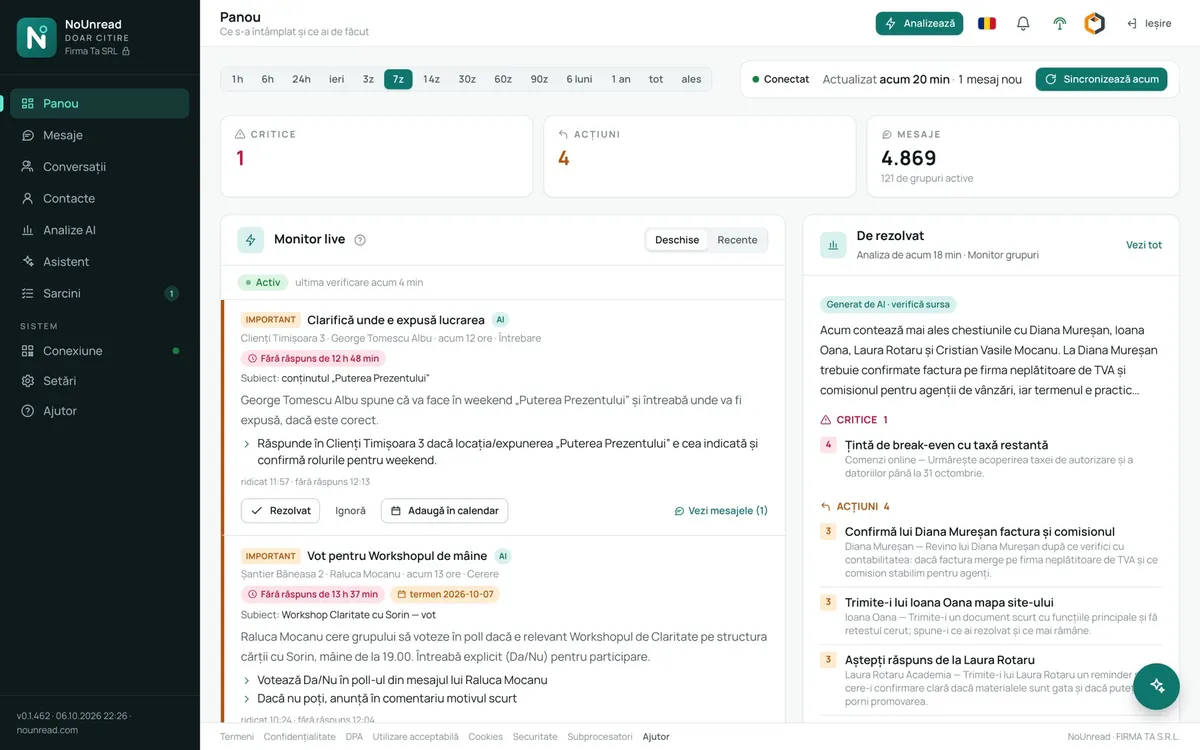
Dashboard and live monitor
Within seconds you know when something urgent comes up in a group: the topic, what was said and what you need to do. You can mark it resolved, set it aside or put it in your calendar. It also closes on its own when later messages show the matter is settled.
- 02
Morning report
It arrives by email at the time you choose. It tells you what is critical, what you need to do and which deadlines fall that day.
- 03
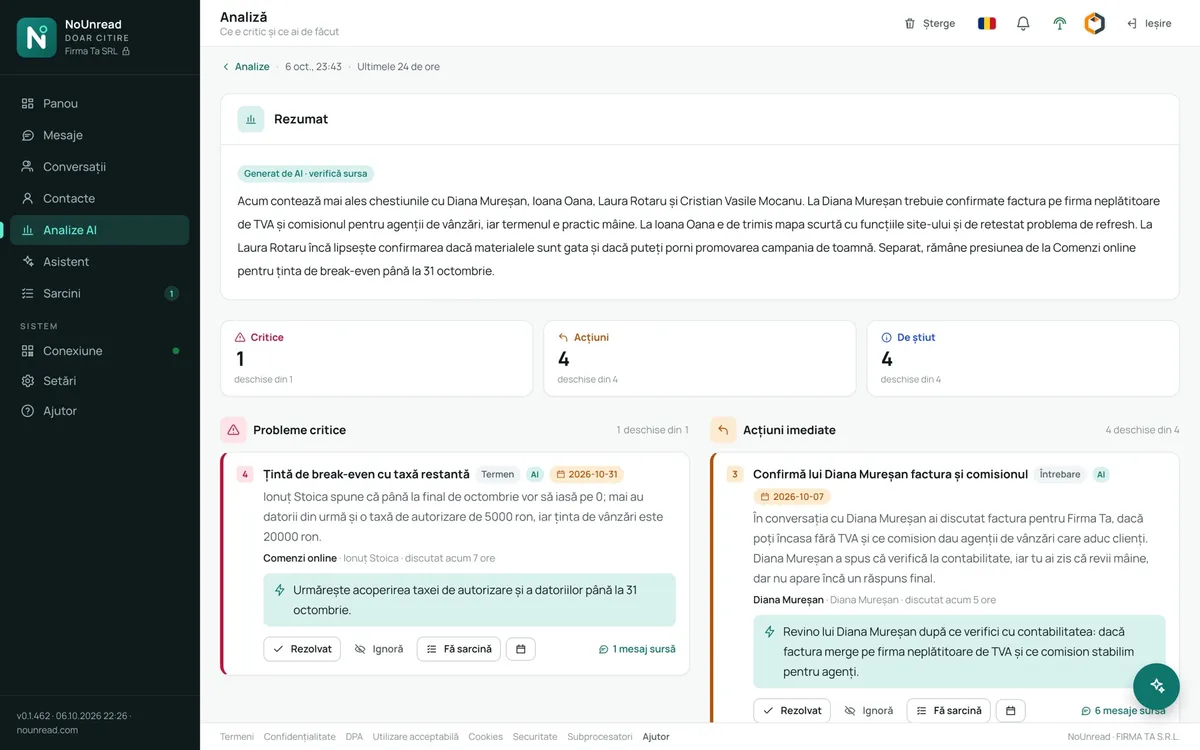
AI analyses
Pick a period of up to 30 days and the groups you care about. You get a summary, critical issues, immediate actions and things worth knowing. Each point comes with its severity, the group, a recommendation and the source messages.
- 04
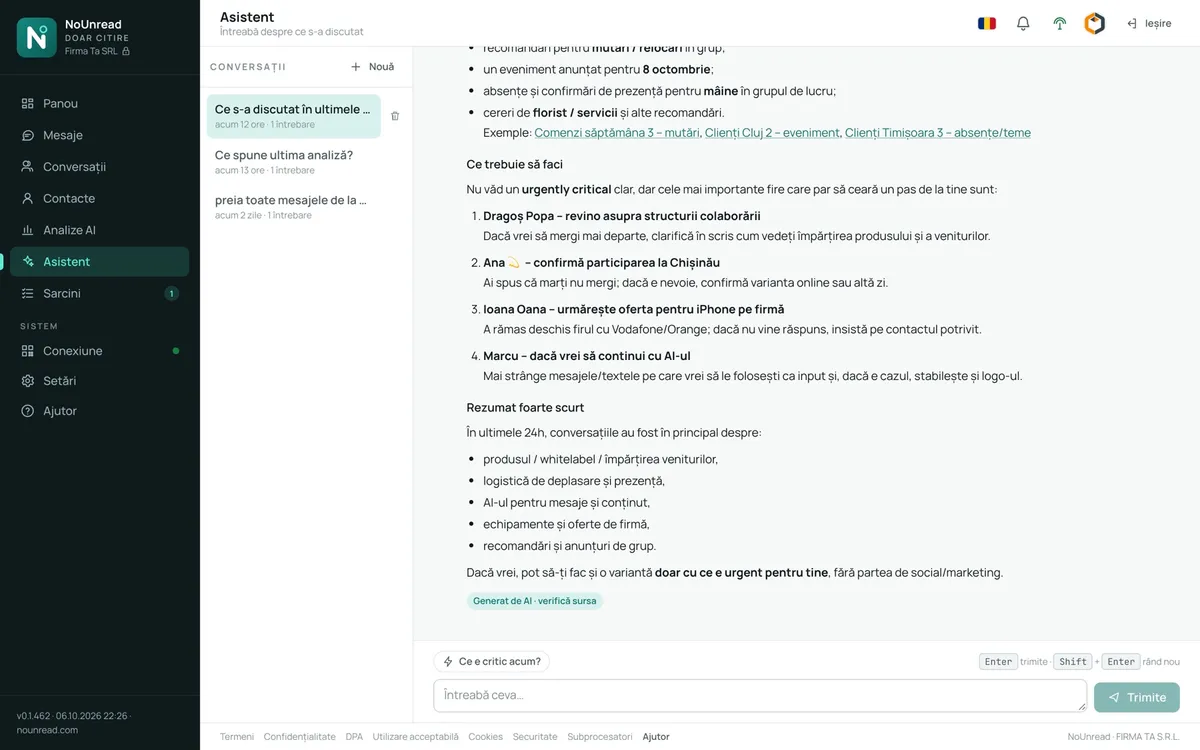
Assistant
Ask “What was decided about the Popescu offer?” and it answers from the messages, with links to the source. It searches the whole history, up to a year back. It can open pages, suggest analyses and create tasks, such as “remind me tomorrow at 10 to call the supplier”.
- 05
Tasks and calendar
Build your list from a message, an analysis or the assistant. Each task can have a due date and a reminder. Send it to Google Calendar or download it as an .ics file.
- 06
Alerts
Watch for words such as “offer” or “invoice”, mentions, polls, or a topic described in a single sentence. Alerts show up under the bell icon, with a link to the message.
- 07
Agents that follow your instructions
You tell them what to look for, what to recommend and what to ignore. The first agent comes ready-written for your line of business.
Getting started.
- 1Create an accountOn nounread.com. Choose a plan and say what your company does.
- 2Scan a QR codeIn WhatsApp, under “Linked devices”, the same way you set up WhatsApp Web.
- 3Messages arrive on their ownWithin 1–3 minutes. Then run an analysis or ask the assistant.
Good to know.
- Read-only. It never sends anything, never replies in groups and never shows up as online. You keep replying from WhatsApp, as you do today.
- Every item comes with the original message next to it. You can check the source in one click.
- Nothing to install. It runs in the browser, on your computer and on your phone.
- Messages, names and numbers are encrypted with your company's key and stored in the European Union. Only your account can see them.
- Only the text goes to the AI, with pseudonyms and without phone numbers. OpenAI does not learn from it.
- Delete a message, a group, a person or everything, at any time. You can export it all to a file that opens without NoUnread.
- It tracks requests, not people. There are no scores and no personal profiles.
Let's talk
Want to see it on your own groups?
Get in touch and I'll show you what NoUnread looks like on your company's conversations.
or call me: +40 726 770 773